Current Member - Members Portal - What is it?
Our Members Portal is an online system where we keep all members' records. Cottingham u3a has many members and there is a significant administrative workload for our volunteer Membership Team.
Therefore it is a great help if our current members have access to their own records and make their own updates whenever their home address or phone numbers change.
Current Member - How do you register on the Members Portal?
If you are currently a member of Cottingham u3a you can register on our Members Portal - you only ever need to do this once!
Please follow the instructions below to register:
- Click on the button below:
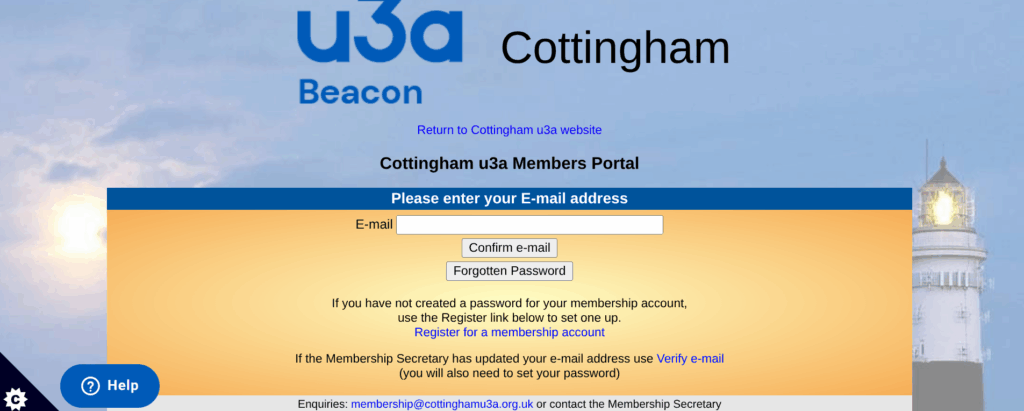
You will be presented with the following screen:
2. On this screen you will need to click on: "Register for a membership account" and you will see the following screen
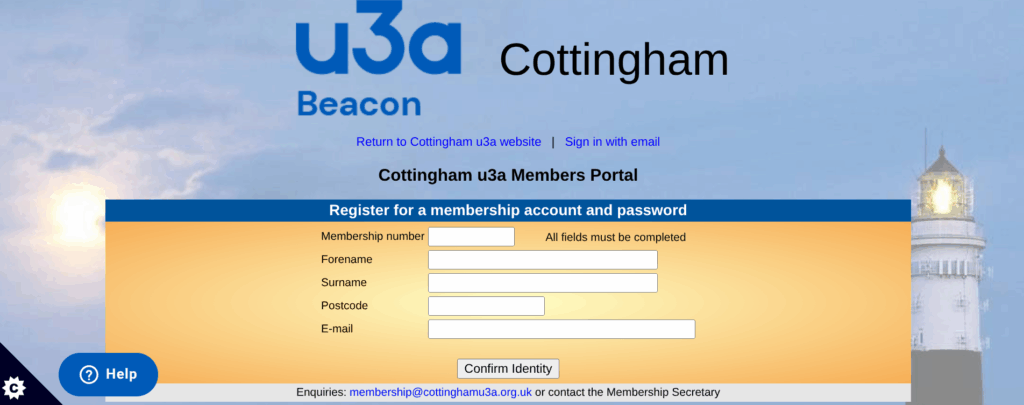
- Type in your Membership number, Forename, Surname, Post code and email address.
- The details entered must exactly match those shown on your membership card.
- Do not enter any spaces at the end of the text.
- A space in the middle of the postcode is acceptable.
- Finally, press the “Confirm Identity” button.
You will now receive an email from Beacon confirming that you have registered for the Member's Portal and asking you to confirm your email address by clicking on the link that you received.
Now that you have registered on the Portal you can use it as many times as you like. When you do log on to the Portal you will notice that there is a selection of Options you can chose from:
- Cottingham u3a Groups
- Calendar of meetings and events
- Update your personal details
- E-Mail replacement membership card
- Renew your membership (This only appears when your membership needs renewing)
Important information regarding renewing your membership:
Please click on the following link for instructions on the renewal process:
We suggest you download these instructions to guide you through the process.